NDOT TSE Crash Data Request Form
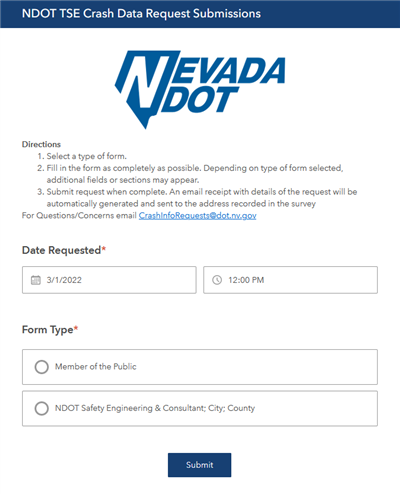
The NDOT Traffic Safety Engineering Crash Data Request Form is a configured Survey123 form intended for use by Nevada citizens and NDOT-affiliated stakeholders when requesting official traffic crash data.
This survey was created using Survey123 Connect and replaces several static PDF request forms that were being used by NDOT. The survey utilizes conditional logic and customization to display specific fields and selection options, based on users input. There are two versions of this survey– one for submissions and one for review and data request fulfillment by the TSE team.
This form is also tied to a custom Microsoft Power Automate Flow (Webhook) that handles the automatic delivery of email receipts to requestors upon survey submission, and notification emails to internal NDOT TSE staff to alert them that a new crash data request has been submitted.
Caltrans Culverts Inspection Form
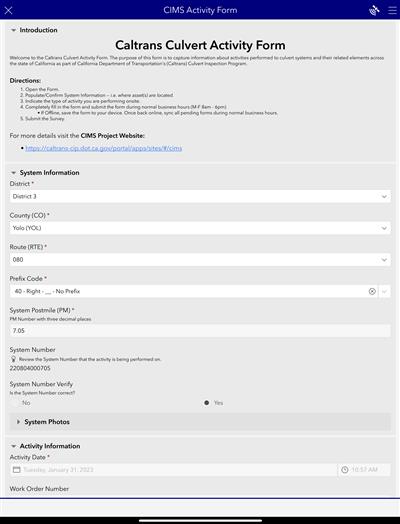
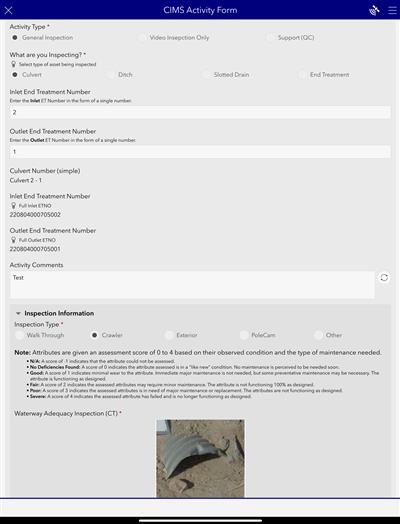
The backbone of the Caltrans Culverts Inspection Management System (CIMS) is the form used to perform the inspection of the asset. This form was designed and configured using ArcGIS Survey123 Connect. The Connect builder was used to accommodate the advanced logic and calculations needed to drive a successful inspection.
Multiple types of assessments are made during an inspection depending on what type of asset is being inspected.
A huge improvement from the previous process is the calculations happening behind the scenes allow inspectors to get instant feedback on the health of the asset while still in the field versus the previous method where the visual assessments had to be taken back to the office and later entered into a spreadsheet and then recorded in the database.
Caltrans Job Hazard Analysis Form


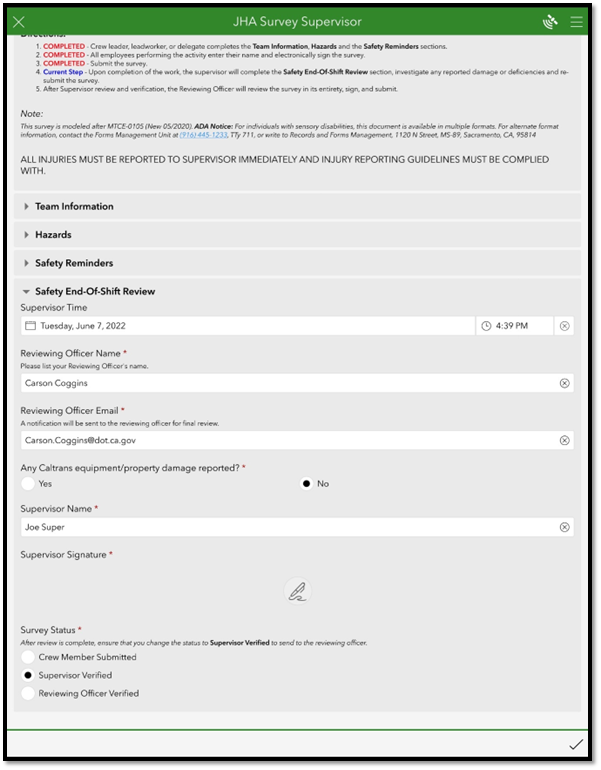

The California Department of Transportation (Caltrans) is responsible for ensuring Land Surveyor Field crews maintain the highest levels of safety standards while completing varies duties in the field. Previously, this was primarily handled through a paper Daily Job Hazard Analysis form that was filled out by Crew Party Chiefs by hand on a daily basis before being submitted at the end of each week.
Timmons Group, an Esri Gold Partner, worked closely with Caltrans to modernize and enhance this Daily Job Hazard Analysis form by creating a series of custom Survey123 forms to replace the original paper versions. The Survey123 forms facilitate a streamlined workflow from the initial submission by field crews to the review of the survey record by a Supervisor and subsequently a Reviewing Officer.
The solution is made up of four total Survey123 forms and published surveys (detailed below), configured Web Maps, and a custom Python script that handles automatic email notifications to Supervisors and Reviewing Officers as Crews submit JHA Survey records.
- Job Hazard Analysis – Survey version that contains all fields and needs to be published first. This provides the full schema of the feature service. This survey is not used to collect survey records.
- Job Hazard Analysis Crew – Step 1 – Survey version with custom values predefined for crew members to see only what they need to see while completing and submitting a Job Hazard Analysis record.
- Job Hazard Analysis Supervisor – Step 2 – Survey version used by Supervisors to review submitted JHA records rather than submit or generate new survey records. The Supervisor survey inbox has been setup to only pull in records that meet the status of status=’crew’ AND supervisoremail=${email}. This query ensures that each Supervisor will only see records where the submitting Crew indicates that person’s specific email before submitting for supervisor review. All fields filled out by crew are in read only mode. Supervisor will verify that status of equipment and property damage, sign, and change status to Supervisor Verified (status=’supervisor’).
- Job Hazard Analysis Reviewing Officer – Step 3 – Survey version used by Reviewing Officers to review Supervisor-approved JHA records. The Reviewing Officer survey inbox has been setup to only pull in records that meet the status of status=’supervisor’ AND officeremail=${email}. This query ensures that each Reviewing Officer will only see records in their inbox where the submitting Supervisor indicates that person’s specific email before submitting for Reviewing Officer’s approval. The final step in the process where the reviewing officer uses the inbox feature to pull in all JHA records that have been verified by a supervisor and assigned to that specific reviewing officer. The reviewing officer will review the entire JHA in its entirety, sign, and change status to Reviewing Officer Verified (status=’officer’).
In order to provide supervisors and reviewing officers with a notice that there are outstanding surveys in their Survey123 inbox, a python script was created to analyze the feature layer and send an automated email to each specific supervisor/officer. This email will supply the user with a link to either the desktop Survey123 application or the mobile application. From here, the users can fill out the appropriate version of the survey and submit it to the next step of the application
As a result of this project, Caltrans has gained a wealth of accurate feedback regarding the safety of the Caltrans workforce each and every day. Caltrans has also been able to remove the need for physical paper forms impacting the speed at which a Job Hazard Analysis record could be reviewed and accepted by Supervisors and Reviewing Officers.
 Carson Coggins GIS Portfolio